

AirCodec · The window
Everything about the link, on one screen.
One window, five tabs, one codec selected. The state in words at the top, what is sent and what is received on the meter bridge, and every figure that tells you whether this link will survive the next hour laid out beneath — each one clickable for 24 hours of its own history.
- Codec 1
- Codec 2
- Codec 3
- Codec 4
- Codec 5
Designed to fit a small rack screen. Tested at 1200 × 870.
Everything about the link, on one screen
Nothing an operator needs mid-show is buried in a settings page. Here is the actual window. Every numbered ring is drawn over the real capture, and the key below says what each one is.
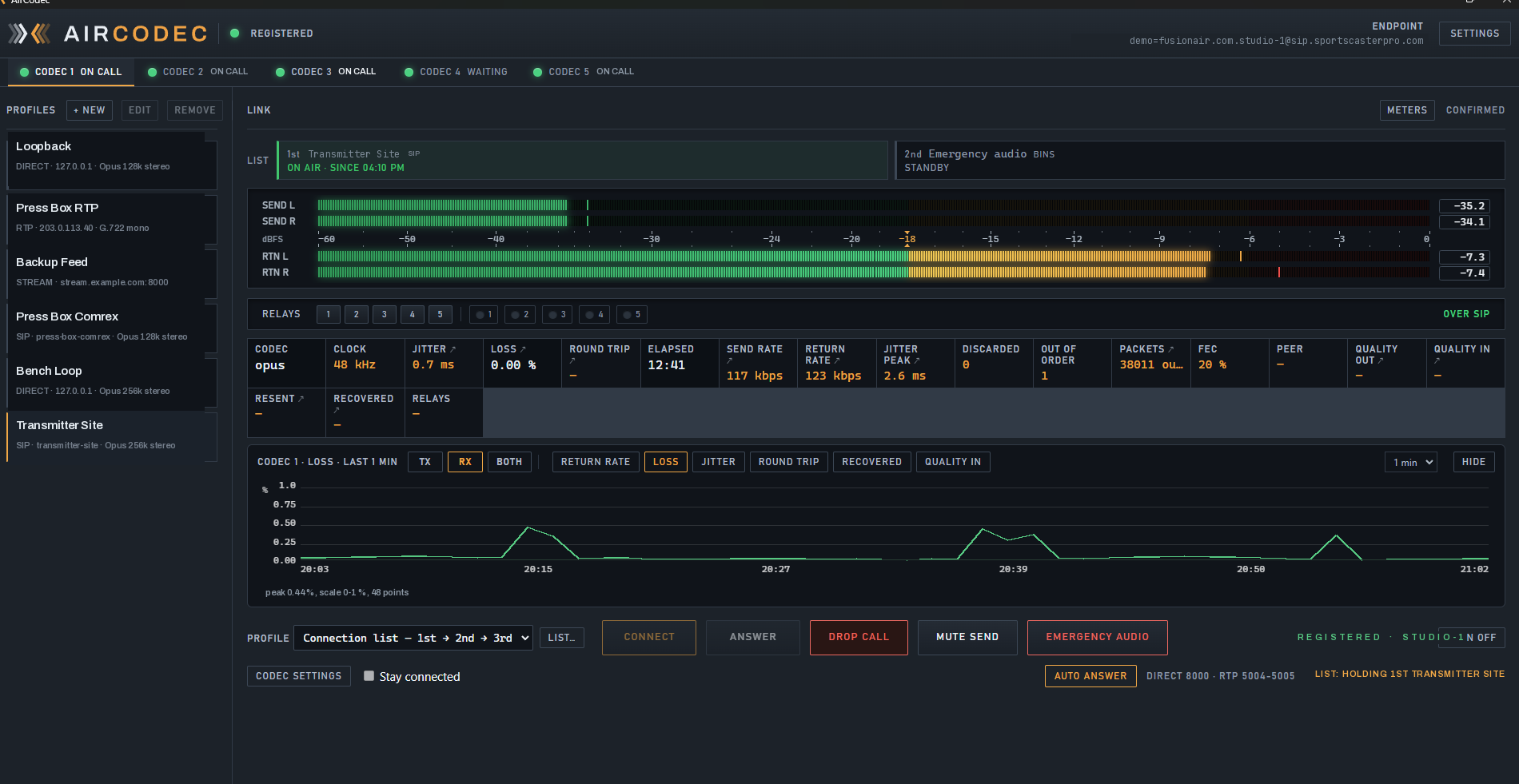
Codec 1 on air, holding the first slot of its connection list. A real capture — the callouts are drawn over it, nothing in the window itself has been redrawn.
Twenty-four hours of evidence, kept on disk
When somebody asks what happened at 4:20 this morning, "it seemed fine" is not an answer. AirCodec keeps the record itself, on the box, through restarts.
Link history
Click any stat cell and it draws that figure's history, with TX, RX and BOTH tabs so the send and the return sit on one graph, a time-span menu, and a note underneath giving each direction's peak.
Closure history
Every relay sent and every relay received, with the time it happened. Click RELAYS instead of a stat cell and the log takes the graph's place.
Activity log
Every call, connection, list move, quiet test, emergency start and stop, relay and error — written in words an operator reads rather than codes they look up. Select it, copy it, paste it into a ticket.
 Open full size
Written for the person reading it at 3 a.m.
The log says what the codec did and why it did it. A link that failed says what failed; a list that moved down says which slot it moved to; a quiet test says what it was testing and whether it held. None of it needs the manual open beside it.
AirCodec
See it running on your own link.
The quickest way to judge a codec is to watch its meters and its round trip on a path you already know. Get in touch and we will set you up to do exactly that.