AirCodec · Security

A codec on the internet should not be an open door.

An unattended transmitter site is the softest thing on most station networks: a box in a locked building that answers anything that reaches it. AirCodec puts three checks between a caller and your audio, and you decide how tight each one is.

Address Password Encrypted — AES-256 Your codec at the site on air Unknown address Refused at the list On the list, wrong password Refused — 5 tries, then locked out 10 min On the list, right password Every refusal is written to the activity log with the address it came from.

Three checks, in that order, on every incoming Direct link. Leave them all open for a bench test and tighten them before the game — it is per codec, not per machine.

Direct

The link that faces the internet gets all three

A Direct link is AirCodec to AirCodec, usually studio to transmitter site, and usually across somebody else's network. It is the one with real exposure, so it is the one with the checks on it — and each is set per codec, so one channel can be wide open on the bench while another is locked down.

1

Where they may call from

Accept Direct callers from is an allow list, checked before anything else. Anything not on it never reaches a password prompt.

  • Single addresses — the studio, the other site
  • Subnets and blocks — the engineering network, a site range
  • As many entries as you need, mixed freely
  • Any address, and let the password decide, when a remote could be anywhere

Use it when both ends are fixed. A studio-to-transmitter link never needs to accept the whole internet.

2

What they have to know

The connection password is checked before the session is established. Without it there is no session and no audio — not a muted channel, nothing.

  • The password itself never crosses the network
  • Five wrong tries and that address is locked out for ten minutes
  • Every refusal is logged with the address it came from
  • Set, changed or cleared per codec, in one field

Use it always on anything facing the internet. It is also what turns on the encryption.

3

What anyone watching would see

With a password set, the whole Direct link is encrypted with AES-256 — not just the control, the lot.

  • The programme audio
  • The contact closures your automation fires
  • The RDS and data riding the same link
  • No certificate to install, nothing to renew

Worth knowing: encryption is Direct-only. Over a SIP call the audio travels through your SIP server and AirCodec does not encrypt it.

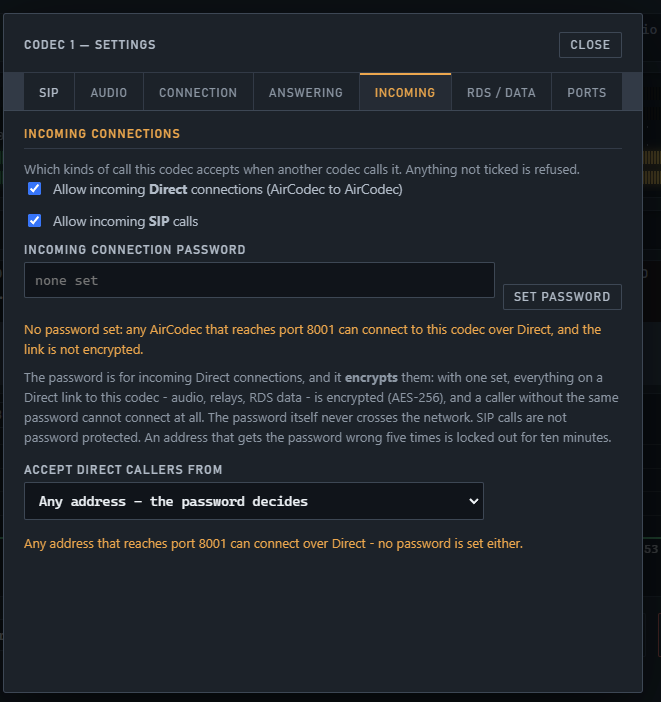
The Incoming tab of a codec's settings: tick boxes for allowing incoming Direct connections and incoming SIP calls, the incoming connection password with a Set password button, an explanation that the password encrypts the Direct link and that five wrong tries locks an address out for ten minutes, and the Accept direct callers from menu Open full size
All of it on one tab, per codec — and the orange line tells you in plain words what the current setting actually leaves open.

It tells you when you are exposed. Leave the password off and the screen says so, in as many words: any AirCodec that reaches this port can connect, and the link is not encrypted. You never have to go looking for what is open — the tab you set it on is the tab that warns you.

SIP

Nobody picks a weak password, because nobody picks one

The usual way a SIP endpoint gets compromised is a human choosing the username and password. AirCodec takes that choice away. The registration server generates both against your account, and for AirCodec's own codecs they are never typed by anybody at all.

Provisioned, not invented

Each codec's SIP username and connection password come from the server the first time that codec registers. Machine-generated, locked to that endpoint, masked on screen until you press Show.

Names are claimed

A name is cleaned to letters, digits, dot and dash, and locked once claimed — so a second box cannot quietly take over a channel's identity by registering under the same name.

Hardware joins the same account

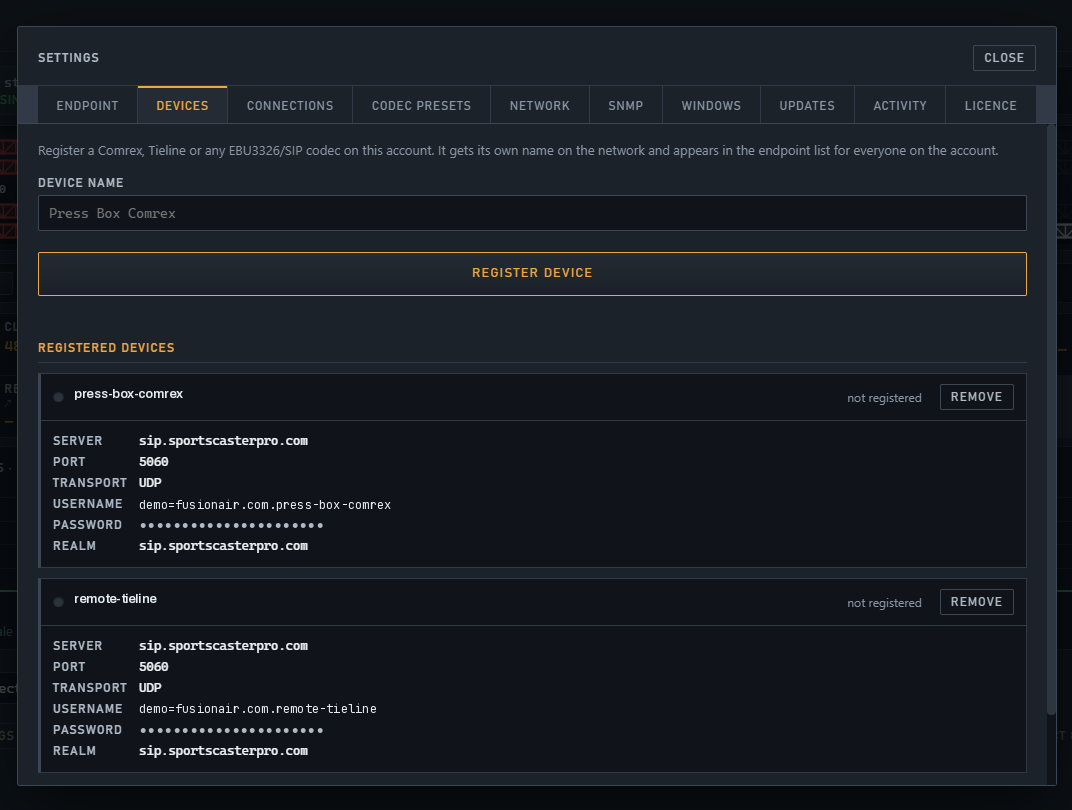
A Comrex or Tieline registered from Settings → Devices gets its own name and its own credentials, visible to everyone on the account and revocable from the same screen. One click and that unit is off.

Nothing is published

Calls arrive by name through the registrar, so no address, port or hostname has to be given out for a remote to reach you — and none has to stay the same next week.

Settings, Devices tab: a device name field with a Register device button, and registered devices each showing the server, port, transport, username, masked password and realm, with a Remove button beside each Open full size
Credentials come back from the server, masked. Remove takes a unit off the account from the same screen.

Where SIP stops. SIP gets you reach and interoperability, not privacy: over a SIP call the audio travels inside the call through your SIP server, and AirCodec does not encrypt it. If what you are sending has to be private across the public internet, use a Direct link with a password.

What each codec answers, and what it writes down

The checks above decide who gets in. These decide whether the codec is listening at all, and what evidence you have afterwards. Both are set per codec, so a transmitter-site channel and a guest channel need not behave alike.

What it will take a call from

Direct — on

Incoming Direct connections

Untick it and this codec will not accept an AirCodec-to-AirCodec call at all, whatever the address or password. A codec that only ever dials out need not listen for anything.

SIP — on

Incoming SIP calls

Untick it and the codec stays registered and can still dial out, but nothing can call it. Useful on a channel that only ever originates.

Auto answer — off

Whether it picks up by itself

A transmitter-site codec has to be answerable; a studio desk usually does not. Per codec, not per machine — with an optional ring-first delay of up to twenty seconds so a human in the room can take it instead.

Codec — off

Off is one click

Turn a codec off entirely and the registration server is told at once. It shows as off at the far end within seconds rather than at the next registration.

What you can prove afterwards

RefusalsA rejected caller appears in the activity log with the time and the address it came from — so a repeated attempt is visible as a pattern, not a hunch.
LockoutsFive wrong passwords from one address locks it out for ten minutes, and that is written down too.
Every state changeConnects, drops, list moves, quiet tests, relays and emergency audio, each with a time, in words an operator reads rather than codes.
24 hours on the boxPer-minute link history on disk, surviving restarts — so "it seemed fine" is never the answer to what happened at twenty past four.
Longer, with BNMBroadcast Network Monitor keeps it 30 days online and raises alerts in plain words, from outside your network.

The SNMP agent is read-only. A monitoring system can poll every figure the codec knows and receive its traps, and it cannot change a single setting. Opening a codec to your NMS does not open it to anything else.

AirCodec

Ask us what you are exposing.

Tell us where the boxes sit and what the firewall between them looks like, and we will tell you which ports actually have to be open and which do not.

Ask about AirCodec See pricing

$499.99 per codec · run up to five on one PC