You decide what's worth a phone call.
Not every blip should wake you up. BNM lets you set what each check tolerates, how long it waits, and who hears about it — so a two-second glitch stays a quiet log entry and real dead air rings your phone.
Info logs. Warnings email. Critical calls.
Every alert BNM raises carries a severity, and severity decides how loud it gets. You set which conditions land in which tier, so the noise floor stays where you want it.
Logged, not loud
Recoveries, status changes and routine notes land on the dashboard and in history. No email, no text, no call — they’re there when you go looking, and silent when you don’t.
Email & SMS
A buffer running low, packet loss creeping up, a short modulation dip — worth knowing, not worth waking up for. You get an email and a text; your phone stays quiet.
The phone call
Off-air, dead air, a device gone dark. BNM places a real voice call and walks your call-down list until someone picks up — email and SMS fire alongside it.
Dead air for two seconds isn’t an emergency. Thirty is.
Real audio at the transmitter’s modulation level is the proof you’re actually on the air — telemetry can say “on” while the air is dead silent. BNM watches that level, and you set how long it has to stay flat before it counts. A passing dropout is ignored; sustained silence escalates to a call. The same threshold-plus-grace applies to every metric — buffer, power, loss — so you set each one to your preference.
- ✓Set the level that means trouble — the threshold
- ✓Set how long it must hold — seconds, or a number of polls — before it fires
- ✓It auto-recovers and logs the dip the moment audio comes back
Controls that keep 3 a.m. quiet.
The point isn’t more alerts — it’s the right ones. These keep the routine stuff off your phone so a real call still means something.
Quiet hours
Overnight, hold warnings to email only — the dashboard still tracks everything. Critical alerts always break through and call.
Maintenance mode
Working a site? Put silence alerts on hold for as long as you want or, set window of time so a planned outage doesn’t dial your whole call-down list at midnight.
Heartbeat mode
For chatty boxes — like a Sage ENDEC — skip the routine "pull" chatter and only alert if the heartbeat goes missing. One alert instead of a hundred.
Alert reminders
An unacknowledged critical re-nudges on your interval until somebody owns it — so nothing gets seen, shrugged at, and forgotten.
Email, text, or call — per person, in your order.
Every person picks how they’re reached — email, SMS, a phone call, or all three. For voice, you set the call-down order: number one rings first, and if they don’t pick up BNM moves to the next, through two rounds, until a human answers. Keep different lists per site or per station, so the right person gets the right fault.
- ✓Per-person email / SMS / call toggles
- ✓Order the call-down list — #1 first, then #2, then #3
- ✓Separate routing per site or per station
Watch anything the box will tell you.
Every driver reads its device’s real metrics — you pick which ones raise an alert, at what level, and how loud. A sample of what’s on the menu:
- Forward power
- Reflected power
- VSWR
- PA temperature
- PA volts & current
- Fan / airflow
- Exciter lock
- Total modulation
- Audio presence
- Audio level (L/R)
- Decoder buffer level
- Buffer underruns
- Jitter
- Packet loss
- Link connected
- Device unreachable
- Ping / latency
- Packet loss
- Interface up / down
- Throughput
- UPS / power state
- Dead-air / silence
- RDS data present
- ENDEC heartbeat
- EAS activity
- Stream up / down
How often it looks — and what that buys you.
"Pulling" works the same for every box on the system. On a timer you set, BNM reaches out — outbound only — reads the live values, stamps them with the time and writes them to history, then checks each one against your limits. Then it waits the interval and does it again. That loop is the whole engine; the interval just sets how fast it spins. "Pull" every 30 seconds and a fault surfaces in under a minute with a dense trail of data behind it. "Pull" every 5 minutes on a stable box and you keep traffic light and history course. Faster where it matters, slower where it doesn’t — your call, per device.
30s → 5 min
Per-device interval. Tighten the air chain, relax the stable gear.
Every Pull Logged
Each reading is timestamped to history — not just the alarms.
Outbound Only
The site never sees inbound load and keeps no ports open.
When it fails, you’ll see exactly when.
BNM logs every reading, not just the alarms. So when a Barix box starts skipping, you don’t only get the alert — you scroll the buffer chart back through the last hour, day, week or month and see the exact minute the underruns started, how deep they ran, and when it recovered. Same for power, modulation, latency — the whole air chain keeps a memory you can walk back through.
- ✓Every metric trended — not just the alerts
- ✓Scroll back 1 hour to 30 days on any device
- ✓Pinpoint the minute it broke — and the minute it cleared
Tune it once. Sleep through the noise.
We’ll set your thresholds, grace windows and call-down list with you on day one — so the only time BNM calls is when it should.
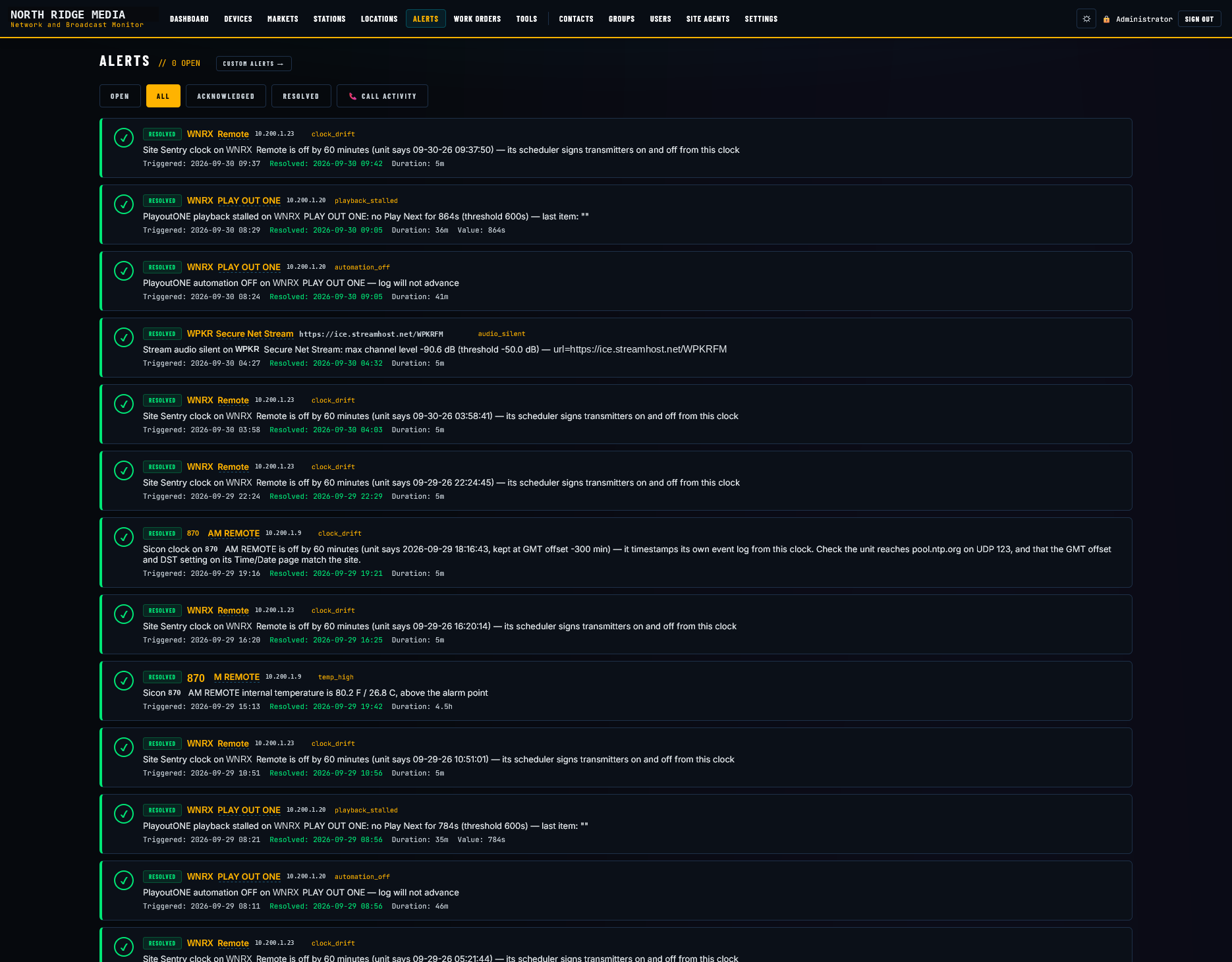
Not just what fired. When it cleared, who cleared it, how long it lasted.
One feed across the whole plant: open, acknowledged, resolved, and the call activity behind them. Each entry says which box, what it was told, when it triggered and when it resolved — a remote's clock drifting, an automation system with nothing to play next, a stream gone silent, a room running warm. Filter it, or read the last week in one scroll.